Building StrikeAlert: An AI-Assisted Options Trading App from Scratch
The Itch I Had to Scratch
So there I was, watching a video from Brandon Powers’ CLT Options methodology — price and volume analysis for timing options spreads — and thinking: “This is great… but what if I didn’t have to stare at charts all day?”
What if a system could watch my tickers, recognize the same PV setups Brandon teaches, and just… tap me on the shoulder when it sees something? Push notification, pre-filled order, one tap to trade. Done.
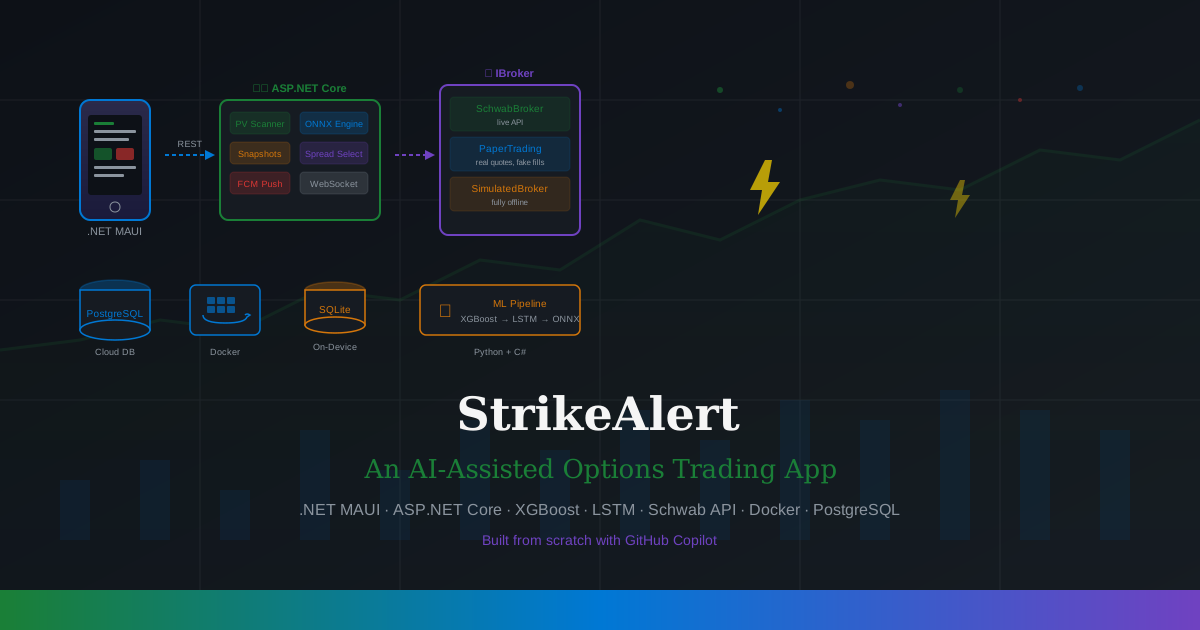
And thus, StrikeAlert was born. A cross-platform app built with .NET MAUI, backed by a cloud ML service, that monitors your watchlist and pushes real-time options spread alerts based on price-and-volume analysis. Android, Windows, XGBoost, LSTM, Schwab API, Docker, PostgreSQL, SQLite — the whole kitchen sink.
What could possibly go wrong?
The Architecture (aka “How Many Technologies Can One Person Use?”)
Here’s the high-level view. Fair warning: there are layers.
flowchart TD
    subgraph Client["📱 .NET MAUI App"]
        direction LR
        WL["Watchlist\n(SQLite)"]
        OPP["Opportunities"]
        ORD["Order Entry"]
        POS["Positions & P&L"]
    end

    Client <-->|"REST API"| Service

    subgraph Service["☁️ ASP.NET Core Service"]
        API["REST Endpoints\n(16 routes)"]
        SCAN["PV Scanner\n(BackgroundService)"]
        SNAP["Chain Snapshotter\n(every 15 min)"]
        ML["ONNX Model Engine\n(XGBoost / LSTM)"]
        SPREAD["Spread Selector\n(CLT Playbook)"]
        STREAM["WebSocket\nStreaming"]
    end

    Service --> BROKER
    Service --> DB
    Service --> PUSH

    subgraph BROKER["🏦 Broker Abstraction"]
        IB["IBroker Interface"]
        SB["SchwabBroker\n(live API)"]
        PB["PaperTradingBroker\n(simulated fills)"]
        SimB["SimulatedBroker\n(fully offline)"]
    end

    DB["🗄️ PostgreSQL\n(positions, snapshots,\nalerts, daily bars)"]
    PUSH["📣 FCM + Windows\nPush Notifications"]

    style Client fill:#0078d4,color:#fff
    style Service fill:#1a7f37,color:#fff
    style BROKER fill:#6f42c1,color:#fff
The MAUI app is the user-facing piece — watchlist management, opportunity feed, order entry, and a positions dashboard. Under the hood it talks REST to an ASP.NET Core backend that does all the heavy lifting: PV scanning, ML inference, options chain snapshotting, and broker communication.
But the part I’m probably most proud of? The abstractions.
The Broker Abstraction: Three Modes, One Interface
Early on I realized that Schwab’s API has a delightful limitation: no paper trading API. Zero. Nada. You can log into thinkorswim paperMoney on your phone like a normal human, but programmatically? Nope. Every API call hits your real money account.
So I needed a way to test the full trading flow without, you know, accidentally buying $10,000 worth of AAPL calls while debugging.
The solution: an IBroker interface that every part of the system codes against, with three implementations:
classDiagram
    class IBroker {
        <<interface>>
        +GetQuoteAsync(ticker)
        +GetOptionChainAsync(ticker)
        +GetAccountPositionsAsync()
        +PlaceOrderAsync(order)
        +GetOrderStatusAsync(orderId)
        +StreamMarketDataAsync(tickers)
        +GetPriceHistoryAsync(ticker)
    }

    class SchwabBroker {
        Real Schwab API
        OAuth 2.0 tokens
        Live quotes + chains
        Real order submission
    }

    class PaperTradingBroker {
        Real Schwab quotes
        Simulated fills
        PostgreSQL positions
        $100k starting balance
    }

    class SimulatedBroker {
        Canned prices
        Ticker-aware drift
        Synthetic chains
        Fully offline
    }

    IBroker <|.. SchwabBroker : live
    IBroker <|.. PaperTradingBroker : paper
    IBroker <|.. SimulatedBroker : simulated
Flip a config value in appsettings.json and the entire system switches modes:
| Mode | Quotes | Fills | Database | Use Case |
|---|---|---|---|---|
simulated | Canned data | In-memory | PostgreSQL | Offline testing, CI |
paper | Real Schwab API | Simulated | PostgreSQL | Validate strategy with real prices |
live | Real Schwab API | Real money | PostgreSQL | Don’t touch this until you’re sure |
The PaperTradingBroker is the sweet spot — it calls SchwabBroker for real-time quotes and options chains, but fills orders at mid-price into PostgreSQL. You get realistic market data with zero financial risk. The SimulatedBroker is for when you don’t even have Schwab tokens handy (or it’s 2 AM and the market is very closed).
This abstraction also means I could swap in Interactive Brokers, Alpaca, or any other brokerage down the road without touching the app or scanner code. Future-proofing that actually paid off during development… which is rare.
The Data Layer: SQLite Meets PostgreSQL Meets Docker
One of the more interesting architectural decisions was having two databases serving different roles:
flowchart LR
    subgraph Phone["📱 MAUI App"]
        SQLite["SQLite\n(offline cache)"]
    end

    subgraph Cloud["☁️ Docker Container"]
        PG["PostgreSQL 17\n(source of truth)"]
    end

    Phone <-->|"REST sync"| Cloud

    SQLite ---|"Watchlist\nlocal cache"| Phone
    PG ---|"Positions\nSnapshots\nAlerts\nDaily Bars\nOrders"| Cloud
SQLite lives on-device in the MAUI app. It holds a local copy of the watchlist so the app works offline. When you add a ticker, it goes to the server first (PostgreSQL is the source of truth), and only saves locally after the server confirms. No more ghost tickers from failed network calls.
PostgreSQL runs in Docker (via a simple docker-compose.yml) and stores everything: watchlists, paper trading positions, order history, options chain snapshots, daily OHLCV bars, alerts, and user preferences. At scale, the options snapshots alone could hit 25 GB/year for 200 tickers — PostgreSQL handles this without breaking a sweat.
The Docker setup is dead simple:
1
2
3
4
5
6
7
8
services:
  postgres:
    image: postgres:17
    container_name: strikealert-db
    ports:
      - "5432:5432"
    volumes:
      - strikealert-pgdata:/var/lib/postgresql/data
One docker compose up and you’ve got a database. No installer, no Windows service, no “which version of Postgres did I install again?” headaches. I even have a production overlay (docker-compose.prod.yml) with health checks and log rotation for the VM deployment.
The ML Pipeline: From Python to ONNX to C#
This was the part that felt the most like actual science. The CLT playbook methodology boils down to reading price and volume together — a breakout with high volume means conviction; a price move on thin volume means weakness. So I needed to turn that intuition into math.
flowchart LR
    DATA["📊 yfinance\n5 years OHLCV\n10+ tickers"] --> FEAT["⚙️ Feature\nEngineering\n12 PV features"]
    FEAT --> TRAIN["🧠 Training\nXGBoost + LSTM\nTime-series split"]
    TRAIN --> ONNX["📦 ONNX Export\npv_xgboost.onnx\nlstm_pv_model.onnx"]
    ONNX --> SERVE["⚡ C# Service\nONNX Runtime\nReal-time inference"]

    style DATA fill:#6f42c1,color:#fff
    style FEAT fill:#0078d4,color:#fff
    style TRAIN fill:#d4760a,color:#fff
    style ONNX fill:#1a7f37,color:#fff
    style SERVE fill:#da3633,color:#fff
The Python pipeline (StrikeAlert.ML/) downloads historical data via yfinance, engineers 12 features from the PV methodology (volume ratios, RSI, MACD, VWAP deviation, OBV slope, etc.), and trains both an XGBoost classifier and an LSTM neural network. The models get exported to ONNX format.
The C# service loads the ONNX model at startup via Microsoft.ML.OnnxRuntime and runs inference behind an IModelEngine interface. The service prefers the LSTM model if it exists, falling back to XGBoost. Same abstraction pattern as the broker — swap implementations without changing calling code.
| The backtesting results were… honestly a bit suspiciously good. Walk-forward evaluation across 8 windows gave a mean F1 of 0.989. But with rule-based labeling (volume > 2× average AND | price change | > 1%), the model is essentially learning to detect volume spikes… which, well, isn’t exactly subtle. The real test will come when I switch to outcome-based labeling — using actual paper trade P&L to train the model on what actually makes money, not just what looks like a setup. |
The feedback loop is already wired: trade outcomes flow back from PostgreSQL to the Python pipeline via a /api/outcomes endpoint. Once I accumulate enough closed trades (~50+), retraining on real results should yield a much more honest accuracy picture.
The Scanner: Two Speeds
The service runs two scanning modes as BackgroundService instances:
Scheduled Scanner — Every 5 minutes during market hours (9:30 AM – 4:00 PM ET, Mon–Fri), it iterates through every watchlist ticker, runs ML batch predictions, and stores alerts. Like a diligent intern checking all the charts on a timer.
Real-time Scanner — Consumes Schwab’s WebSocket streaming API, watching for volume spikes in real-time. When incremental volume exceeds 2× the 5-minute average, it triggers an immediate ML prediction. This catches fast-moving setups that the 5-minute scanner might miss.
Both scanners respect user preferences: minimum confidence thresholds, per-ticker cooldowns (so you don’t get 47 notifications about the same AAPL setup), strategy filters, and a daily alert cap. Because nobody wants their phone buzzing every 30 seconds during a volatile market day.
The VM Data Collector: Because Laptops Sleep
Here’s something I didn’t think about initially: options chain snapshots are irreplaceable. Schwab provides real-time chains but zero historical options data. If my laptop sleeps through market hours, those snapshots are gone forever.
The solution? A dedicated VM (either a local Hyper-V box or an Azure B1s at ~$8/month) running the service in Docker, collecting snapshots every 15 minutes during market hours. It builds a proprietary dataset over time — one that no free API can give you.
I wrote export/import PowerShell scripts so I can pull the collected data back to my dev machine for ML training. The dev machine and VM are completely independent — one is for coding, the other is for relentless data collection.
The MAUI App: One Codebase, Two Platforms
The .NET MAUI app targets both Android and Windows from a single C# / XAML codebase. On desktop, you get a split-pane dashboard with watchlist, opportunities, and positions side by side. On mobile, it’s a flyout-nav experience designed for quick glance-and-trade workflows.
The views:
- Dashboard — overview with badges for watching tickers, active alerts, and open positions
- Watchlist — add/remove tickers, pull-to-refresh, swipe-to-delete
- Opportunities — ML-detected alerts with color-coded direction cards (green for bull, red for bear)
- Order Entry — pre-filled from the ML suggestion with spread leg builder and cost validation
- Positions — account summary, open positions with live P&L, order history
- Settings — risk tolerance, confidence threshold, notification controls
- Service Health — token status, service connectivity, re-auth button
Everything uses MVVM via CommunityToolkit.Mvvm, and the API client is a typed HttpClient wrapper behind an IStrikeAlertApi interface in the shared library. Same contract on both sides of the wire.
What Copilot Brought to the Table
I’d be lying if I said I didn’t have help. This entire project was built collaboratively with GitHub Copilot, following the AI Task Flow methodology I’ve written about before. Each phase went through a structured plan → implement → review → iterate cycle.
Some highlights of what AI collaboration looked like on this project:
- Phase 1 scaffolding — Copilot set up the entire solution structure, DI wiring, and the
IBrokerabstraction in a single session. The clarifying questions it asked about broker modes saved me from a design mistake I wouldn’t have caught until Phase 3. - The Schwab OAuth dance — OAuth 2.0 with a 7-day refresh token and 30-minute access token is… not fun. Copilot nailed the token lifecycle management, including the disk-persistence and 60-second refresh buffer, on the first try.
- PV Feature Engineering — Getting 12 financial indicators implemented identically in both Python (for training) and C# (for inference) was error-prone. Having Copilot cross-reference the two implementations caught a subtle RSI calculation difference that would have silently degraded predictions.
- Cross-platform timezone bug —
TimeZoneInfo("Eastern Standard Time")works on Windows but explodes on Linux/Docker. Copilot caught this during the Docker deployment and centralized it into aMarketHours.GetEasternTimeZone()helper with anAmerica/New_Yorkfallback.
The project went from empty repo to 70 passing tests, 16 API endpoints, two ML models, and a working paper-trading pipeline in about two weeks. I’m not saying I couldn’t have done it solo… but it would have taken a lot more weekends.
Current Status & What’s Next
As of now, the system is fully operational in paper trading mode:
- ✅ 5 phases complete — foundation, data & model, cloud service, end-to-end flow, refinement
- ✅ 70 tests passing across C# and Python
- ✅ VM collecting data — options chain snapshots accumulating daily
- ✅ Two ML models — XGBoost and LSTM, both exported to ONNX
What’s on the backlog:
- 🔲 Firebase push notifications (Android end-to-end)
- 🔲 Interactive price charts on the desktop dashboard
- 🔲 Model retraining on real trade outcomes (need ~50+ closed trades)
- 🔲 CI/CD pipeline via GitHub Actions
- 🔲 The big one: flipping to
livemode with real money 💸
That last one is… going to require a few more deep breaths and maybe a stiff drink. But that’s the whole point of the paper trading phase — prove the model works before you let it anywhere near your actual brokerage account.
The Takeaway
If you’re thinking about building a personal trading tool, here’s what I’d tell you:
- Abstract everything. The broker, the ML model, the data source — put interfaces in front of all of them. You will swap implementations, and you’ll thank yourself later.
- Paper trade first. Seriously. Build the full pipeline with simulated fills before touching real money. The
PaperTradingBrokerpattern (real quotes, fake fills) is the sweet spot. - Collect your own data. If your data source doesn’t offer historical options chains (Schwab doesn’t), start snapshotting from day one. A $8/month VM pays for itself in irreplaceable training data.
- AI collaboration works. Not “generate and pray” — actual structured collaboration with plans, reviews, and iteration. The AI Task Flow approach turned a massive project into manageable phases.
Now if you’ll excuse me, I need to go check if my VM is still collecting snapshots. Because that data is irreplaceable… and I may have accidentally rebooted it during a Windows Update. 😬
StrikeAlert is a personal project and not financial advice. Options trading involves risk of loss. Don’t let an ML model yeet your retirement savings into weekly SPY puts.